LEGO® DUPLO® World
StoryToysEducational
4.3485.00 Reviews
- Version
- 36.0.0
- Installs
- 10.00M
- Age Rating
- Everyone
Screenshots

Our Review of LEGO® DUPLO® World
 Analysis by Appyee
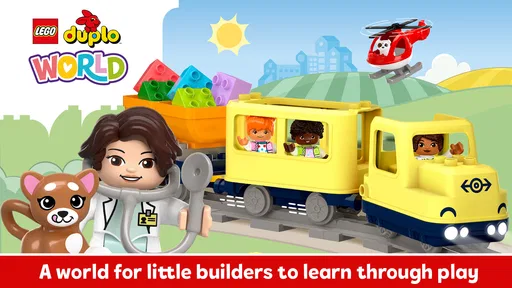
When I first opened LEGO® DUPLO® World, I was struck by how much it feels like a play space rather than a lesson screen. The colors are bright without making the whole experience feel frantic, and the familiar chunky-brick look gives the scenes a clear identity. As an educational game from StoryToys, it is aimed at young children, but I think its appeal depends less on a child already loving LEGO and more on whether they enjoy tapping, building, and making small discoveries at their own pace.
A first visit that invites exploration
The opening impression is friendly and easy to approach. Play areas built around subjects such as trains, animals, and numbers give a child obvious things to notice, while the interactive scenes encourage them to try an action instead of simply watching. That distinction matters: a child can tap around out of curiosity, then start to connect what they do with what changes on screen. I found the overall mood more like a toy box laid out on a table than a conventional game with a race to finish.
It is a free game for everyone, and its broad reach is reflected in an average rating of 4.2 from around 25,000 ratings, with over 10 million installs. Those figures suggest it has found an audience, but they do not tell me whether it will suit every household. The useful question is whether your child likes open-ended play and simple interactions, or prefers a clear challenge with a score and a definite end. This is much closer to the first kind.
How its little world communicates
The scenes lean on recognizable objects and a toy-like visual language, so children can often work out what they are looking at before an adult explains it. Farms, animals, trains, and building pieces are easy subjects to talk about together. That makes the app useful beyond solo screen time: I can imagine sitting beside a child and asking what they want to build, which animal they spotted, or what might happen if they move a piece somewhere else.
The different play areas also help keep the setting from feeling like one long building task. A child drawn to vehicles can start with trains; a child who prefers animals may gravitate to the farm. I would use that flexibility to follow a child’s interest rather than trying to move them through every area in order. For a short play session, choosing one scene and staying with it can be more satisfying than hopping around just to see everything.
Sound, pace, and the feeling of play
The cheerful art direction and playful sound effects work together to make the world feel welcoming. The audio gives actions a little sense of response, while the animations keep the scenes lively. I like that combination for young players because it can make an interaction feel rewarding without needing a complicated explanation. The pacing is gentle enough for experimenting, rather than pushing a child to react quickly or compete against a timer.
That calmness is a strength, but it also sets expectations. Children who want fast movement, dramatic stakes, or a constant stream of new challenges may find the experience too quiet. I would not choose it as a substitute for an action game, nor would I expect its sound and motion to hold every child’s attention for a long stretch. It works best as a playful activity that can be picked up, explored, and put down when interest fades.
What children do, and what they can learn
I’d treat the learning here as something that can grow out of a child’s own choices, rather than a sequence they have to complete. When we pause to name a color, count a few objects, or talk about what a character might do next, the same scene can support a different kind of conversation each time. That open-ended approach is also why the game suits curious, unhurried play better than children looking for a clear lesson to finish.
Learning through simple actions
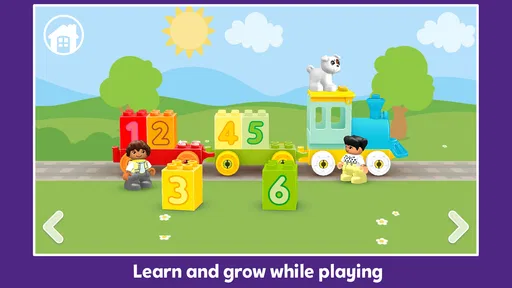
The educational side is woven into play rather than presented as a formal lesson. Children encounter numbers, colors, and shapes while moving through the scenes, and the number train gives counting a hands-on context. Dragging and dropping pieces can also exercise fine motor control. I would think of these as useful opportunities for practice, not as a promise that the app will teach a skill on its own. A short conversation with an adult can help turn a tap or a build into a moment of noticing and naming.
One practical way to use it is to let a child lead while you add a small prompt: count what is on the train, compare two colors, or describe the shape they placed. Then give them room to carry on without turning play into a quiz. This keeps the child’s choices at the center and makes the learning feel connected to what they are already doing. If they are not interested in counting that day, the scenes still offer imaginative play.
Where it fits among children’s games
Compared with a basic coloring app, this offers more interaction with objects and building; compared with a structured early-learning game, it feels less like a sequence of exercises. That is a useful middle ground for a child who enjoys exploring but is not ready to sit through a lesson-style activity. On the other hand, if your priority is a clear curriculum, repeated practice, or a measurable path through skills, a purpose-built learning app may be a better match. If you want physical construction above all, real DUPLO bricks offer tactile play and do not involve a screen.
I would also treat the app as a companion to other play, not a replacement for blocks, books, or time spent talking and moving around. Its particular strength is making a small digital scene responsive to a child’s choices. The trade-off is that screen-based dragging can only approximate the feel of picking up and joining real pieces. That difference is especially worth considering for a child who learns best by handling objects or tends to become absorbed in screens for longer than you intend.
A realistic way to use it at home
For an everyday example, I can see this working during a quiet stretch before dinner: a child picks the farm, explores the animals, and builds for a little while as an adult nearby asks what they are making. Keeping the session focused on one area gives the child a simple starting point and makes it easier to stop naturally when the meal is ready. If the child becomes frustrated or starts tapping without interest, I would close the game and offer a different activity rather than trying to coax them into continuing.
A small tip is to let the child show you what they have discovered before you explain anything. That gives you a better read on whether they are enjoying the building, the characters, or the number activity, and it helps you choose a suitable scene next time. Another useful approach is to use the same play area for different kinds of conversation on different days: one session can focus on colors, another on counting, and another simply on making up a story. The app does not need to become a lesson plan to support those moments.
Practical expectations for parents
The app is free to download, with optional in-app purchases ranging from $0.99 to $39.99 per item. Those purchases matter because a child may become attached to a particular kind of play and ask for more content. I would check what is available together with the child before treating the free starting experience as a complete catalogue, and I would decide in advance how you want to handle purchase requests. The game is suitable for everyone, but that age label does not remove the value of an adult helping a young child navigate screen time and spending.
Its current version is 33.1.1 and it requires Android 6.0 or later. The game first appeared on October 10, 2019, so it is not a brand-new release; its continued presence in the children’s game space is a reason to consider it, though I would still judge it by how your child responds rather than by longevity alone. If you are choosing for a very young player, the key practical question is whether they can enjoy simple touch interactions with a nearby adult available when they need help or want to share what they have made.
Who I would recommend it to
I would recommend it to families looking for a gentle, creative activity for a young child who likes animals, vehicles, or building. It is particularly appealing when you want something more interactive than a video but less structured than a drill-based learning game. The best moments are likely to come when a child has time to explore and an adult is willing to join in briefly, rather than when the app is expected to occupy them for a long, uninterrupted stretch.
I would skip it if you are looking for a deep building simulator, a challenging game with levels to master, or a tightly organized educational course. It may also be a poor fit if your child prefers physical toys or gets upset when optional content is visible but unavailable. In those cases, a box of bricks, a book about animals, or a more focused learning activity may be a better choice. Knowing that distinction before downloading makes the game easier to appreciate for what it actually offers.
Themes and Play Areas
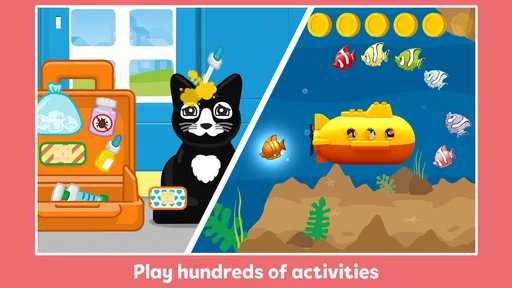
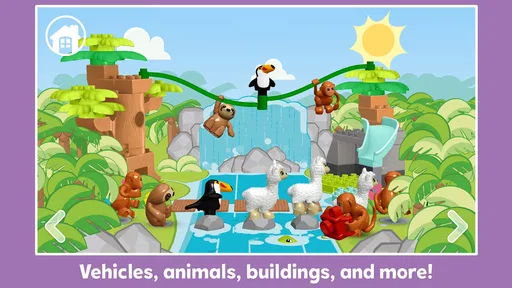
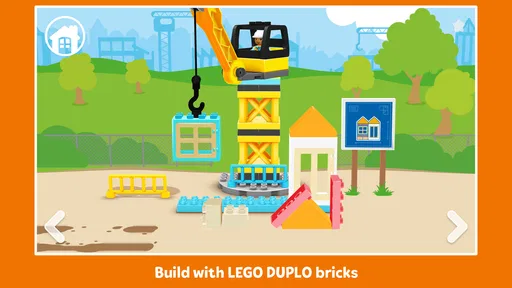
One of the standout features is the variety of themes. Whether your kiddo is into farms, underwater escapades, or just building crazy structures, there’s something here to spark their interest. My personal favorite is the farm theme. It’s not just about stacking bricks; there are cute animals to play with, crops to harvest, and of course, endless opportunities to build whatever your imagination can cook up.
Educational Value
Now, I know what you’re thinking: is this just another game, or does it have some educational juice to offer? Well, it’s actually both! The app cleverly incorporates learning into play. Kids can learn about numbers, colors, and shapes without it ever feeling like a chore. The number train is especially nifty, teaching counting in a fun, hands-on way. Plus, it helps develop fine motor skills as kids drag and drop bricks to build their creations.
User Experience and Design
The design of the app is just delightful. Everything is colorful and engaging, perfectly capturing the essence of playing with real LEGO DUPLO bricks. The animations are smooth, and the sound effects add an extra layer of fun to the experience. Even as an adult, I found myself getting lost in the playful environment.
Parental Controls and Safety
For those of you concerned about screen time and safety, LEGO® DUPLO® World has got you covered. The app is free from ads, which is a huge plus in my book. There are also parental controls that let you manage what your child can access. This ensures a safe, focused playtime without any unwanted distractions.
In-App Purchases
While the app itself is free to download, there are in-app purchases available. These unlock additional content and themes, which can be pretty tempting once your kids get hooked. It’s worth keeping an eye on this if you’re not looking to spend. However, even without the extras, there’s plenty of content to keep the little ones entertained for hours.
Final Thoughts
In a nutshell, LEGO® DUPLO® World is a wonderful app that blends creativity, fun, and learning into one neat package. It’s perfect for young children, providing a safe and engaging environment to explore and learn. Whether you’re a parent looking to sneak in some educational play or just a LEGO enthusiast, this app is definitely worth checking out.
So, go ahead and dive into the world of LEGO DUPLO. It’s a digital playground that promises endless fun and learning opportunities for the younger crowd. Happy building!
Privacy and Permissions
See what permissions an app requests and how it handles your data.
- Photos/Media/Files
- read the contents of your USB storage, modify or delete the contents of your USB storage
- Storage
- read the contents of your USB storage, modify or delete the contents of your USB storage
- Wi-Fi connection information
- view Wi-Fi connections
- Other
- view network connections, full network access, prevent device from sleeping, Google Play license check
Verdict
Strengths of LEGO® DUPLO® World
- Interactive play enhances creativity.
- Educational content for early learning.
- Easy-to-navigate interface for kids.
- Regular updates with new activities.
- Safe, ad-free environment for children.
Limitations of LEGO® DUPLO® World
- Limited content in the free version.
- Requires internet for some features.
- May have in-app purchases.
- Some activities can be repetitive.
- Large app size may require storage space.
Other Releases by StoryToys
View All
Marvel HQ: Kids Super Hero Fun
Educational4.2

LEGO® DUPLO® Peppa Pig
Educational4.3

Disney Coloring World
Educational4.3

My Very Hungry Caterpillar
Educational4.0
Similar Picks in This Category
View All
Little Panda Policeman
BabyBus4.0

Monster Trucks Game for Kids 2
Raz Games4.1

Little Panda's Chinese Recipes
BabyBus4.4

Little Panda's Restaurant
BabyBus4.4

Little Panda's Ice Cream Games
BabyBus4.3

Baby Panda Care
BabyBus3.8
Frequently Asked Questions
What is the main objective of LEGO® DUPLO® World?
LEGO® DUPLO® World is designed to provide a playful learning experience for young children. The app focuses on developing key skills such as creativity, problem-solving, and fine motor skills through interactive play. It offers a variety of activities and mini-games centered around different themes, encouraging exploration and imagination.
Is LEGO® DUPLO® World suitable for all age groups?
LEGO® DUPLO® World is primarily designed for children aged 2-5 years. The content and activities are tailored to support early learning and development. The app features engaging and age-appropriate challenges that are simple enough for young children to enjoy, making it an excellent tool for parents and educators.
Does LEGO® DUPLO® World require an internet connection to play?
While LEGO® DUPLO® World does not require a constant internet connection for basic play, certain features, updates, and additional content might need online access. It is advisable to connect to the internet periodically to ensure the app is up-to-date and to access any new content or features.
Are there in-app purchases in LEGO® DUPLO® World?
Yes, LEGO® DUPLO® World does offer in-app purchases. These purchases can unlock additional themes, activities, and features within the app. Parents can manage these purchases through device settings to ensure a safe and controlled environment for their children while using the app.
How does LEGO® DUPLO® World ensure child safety and privacy?
LEGO® DUPLO® World is committed to maintaining a safe and secure environment for children. The app adheres to strict privacy policies and provides parental controls to manage playtime and purchases. Personal data is protected, and the app is designed to comply with relevant child safety regulations to ensure a worry-free experience for parents.
Play our best games!


